Why You Can’t Add a Card to ChatGPT Ads and How to Pay for Advertising Without One
A card most often cannot be added to ChatGPT Ads because the bank declines the verification authorization, the billing address does not match, or international online payments are restricted. Even if the card is successfully linked, this does not guarantee uninterrupted ad delivery: OpenAI charges the card after the billing threshold is reached and at the end of the month. If a payment fails, ads may stop running.
An alternative is to pay for ChatGPT advertising through Billing Media, a billing partner. The company issues an invoice in UAH or an agreed currency, funds the advertising account, and provides an agreement, invoices, and service acceptance certificates for accounting purposes. A corporate foreign-currency card is not required.
How OpenAI Verifies a Card in ChatGPT Ads
Before launching campaigns in OpenAI Ads Manager, you need to set up a billing profile: enter the company name, address, and email address for invoices. You can then add a payment card and specify its billing address.
During verification, OpenAI may temporarily place a hold on a certain amount on the card. This is an authorization to verify the payment method, not a charge for advertising. The amount depends on the account’s country and currency. The bank may hold the amount for up to 8 days or longer.
Campaigns will not start running without a verified payment method, even if the ads have already passed moderation. You can read more about the procedure in the OpenAI payment help article.
Why a Card Can’t Be Added: The Main Reasons
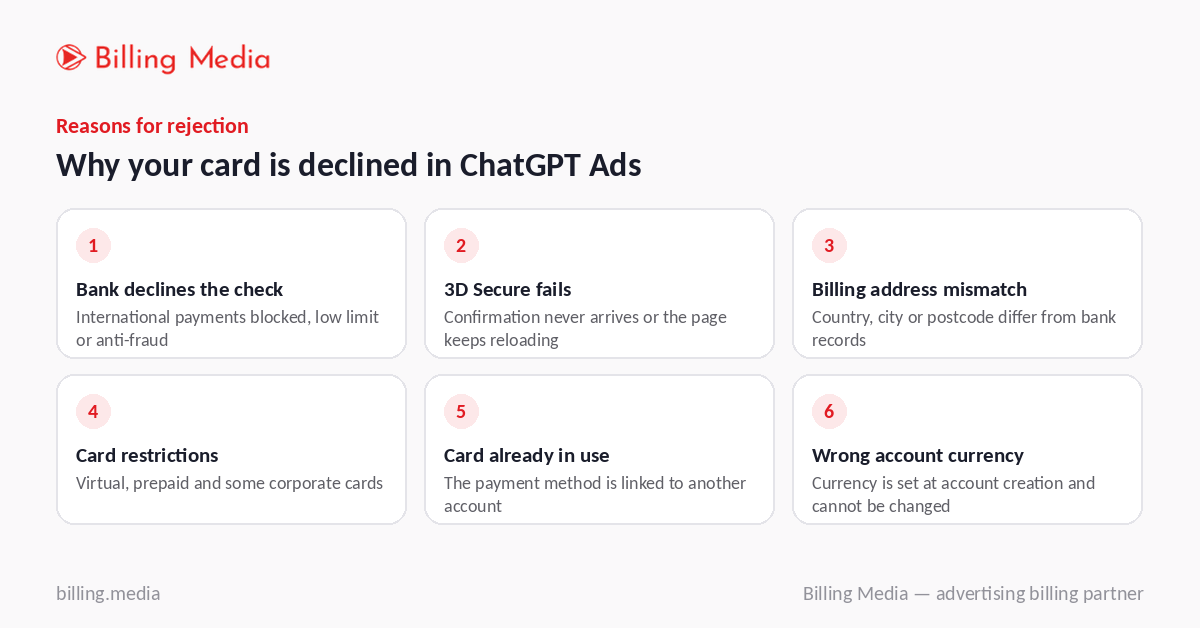
An error when adding a card to OpenAI Ads does not always mean that the payment method is invalid. The cause may lie in the bank or advertising account settings.
The bank declines the verification transaction. If international online payments are disabled, the card has a low limit, or the bank’s anti-fraud system is triggered, the authorization may fail. Check the card settings and available balance.
3D Secure verification fails. The confirmation may not arrive in the banking app, or the verification page may keep restarting. Make sure your bank supports these confirmations and allows online transactions.
The billing address does not match. The profile details must match the information registered with the bank. Check the country, street address, city, and postal code.
The card has restrictions. Virtual, prepaid, and some corporate cards may not support the required type of transaction. Check the terms of use with your bank.
The card is already being used in another account. If the system reports a payment method restriction, contact support to find out why.
The account currency is not suitable. It is selected when the advertising account is created. It may not be possible to change the currency after the advertising account has been created.
What to Do to Add a Card Yourself
If your card is declined in ChatGPT Ads, try the verification process again after taking the following steps:
- Enable online payments and international transactions with your bank, and check your limits and available balance.
- Compare the billing profile details with your banking information. Complete all address fields without abbreviations or errors.
- Try another card — a physical debit or credit card that supports international payments.
- If the issue persists, email ads-support@openai.com. Include your advertising account ID, the exact error message, when it occurred, and a screenshot with the card details concealed.
Support may take several days to respond. Ad launch may be delayed during this time, so it is important for a business to have an alternative funding method.
Even an Added Card Does Not Guarantee Stable Ad Delivery
ChatGPT Ads uses a post-payment model: ads are shown first, and OpenAI then charges the card. This happens when the billing threshold is reached and at the end of the month if there is still an outstanding balance.
New accounts usually have a low initial threshold, so charges may occur quite frequently. A bank’s security system may consider frequent, similar transactions suspicious and decline the next charge. If this happens, ads may stop running until the issue is resolved.
The standard settings do not provide an option to change the threshold through OpenAI support.
Accounting is another consideration. With direct payments, OpenAI issues documents in a foreign currency according to the billing profile settings. The company must review these documents and arrange for the expenses to be recorded in its accounts.
Paying for ChatGPT Ads Through Billing Media, a Billing Partner
If you cannot add a payment card or your company does not want to rely on automatic charges, you can use Billing Media’s billing service. In this case, the advertiser pays an invoice, while the partner funds the account and provides the supporting documentation.
The main benefits of this arrangement are:
- No card linking required. You do not need to verify a payment method in OpenAI Ads Manager. The company pays an issued invoice, so card authorization issues do not affect the settlement process with the partner.
- Payment in UAH or a foreign currency. Billing Media issues invoices in UAH or in EUR or USD via SWIFT. The advertising budget is credited to the account in US dollars.
- Accounting documents. The company receives an agreement, invoices, and service acceptance certificates to record its expenses.
- Funding planning. Account top-ups can be agreed in advance in line with the advertising budget. This helps prevent campaigns from stopping because an automatic card charge was declined.
- One partner for different platforms. Billing Media works with OpenAI Ads, Google Ads, Meta Ads, TikTok Ads, and LinkedIn Ads. This makes it possible to centralize payments and document management under one agreement.
- Transparent terms. The exchange rate, fee, and timelines are specified in the agreement before payment. The company approves the financial terms of cooperation in advance.
At the same time, your team or contractor remains responsible for managing advertising campaigns. Billing Media handles payments, account top-ups, and documentation, not ad setup or optimization.
Learn more about topping up ChatGPT Ads through Billing Media.
Card or Billing: Which Should You Choose?
Both methods let you fund ChatGPT advertising, but they differ in how payments are organized, how documents are handled, and how the advertising budget is controlled.
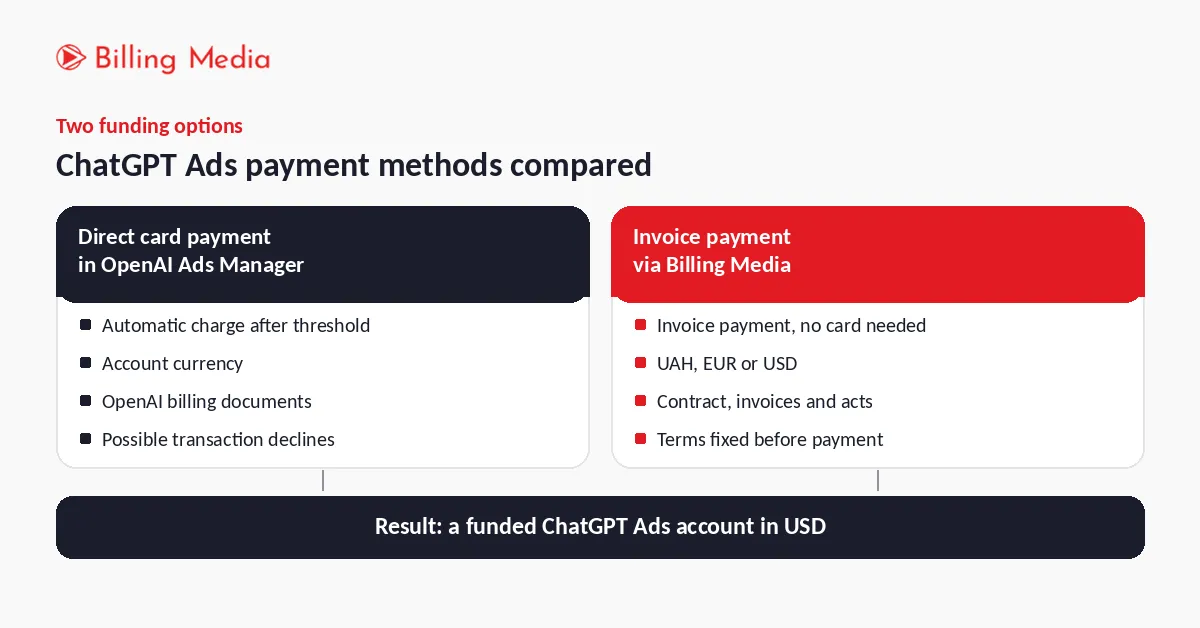
| Criterion | Card in Ads Manager | Through Billing Media |
| Payment method | Bank card | Invoice payment |
| Invoice payment | When funds are paid After the threshold is reached and at the end of the month | Under the agreed terms |
| Declined payment | Ads may stop running | No reliance on card charges |
| Payment currency | Account currency | UAH, EUR, or USD |
| Documents | From OpenAI | Contract, invoices, and service acceptance certificates |
| Multiple platforms | Separate payment processes | One partner for several platforms |
Direct payment is suitable for companies that have an eligible corporate card, can make international payments, and handle the accounting for these expenses themselves.
Billing Media is worth choosing if you cannot add a card to ChatGPT Ads, need to pay an invoice in UAH, or want to centralize payments across several advertising platforms. It is also a convenient option for businesses that need to agree on financial terms in advance and receive documents for accounting purposes.
How to Start Paying for ChatGPT Ads Through Billing Media
To switch to payment through a billing partner, you do not need to spend time repeatedly trying to link a card. You only need to agree on the budget and formalize the cooperation.
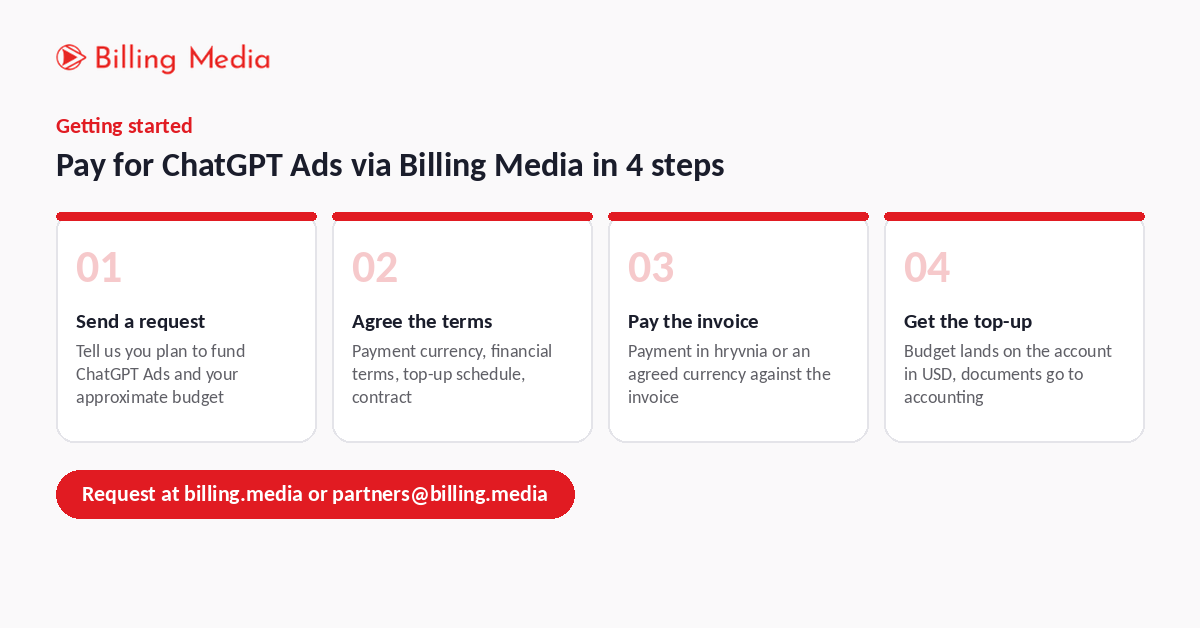
The process consists of four steps:
- Submit a request. Fill out the form on the Billing Media website or email partners@billing.media. State that you plan to top up ChatGPT Ads and provide an estimated advertising budget.
- Agree on the terms and sign the agreement. The Billing Media team will agree on the payment currency, financial terms, and top-up schedule. Once the terms are approved, the parties sign an agreement.
- Pay the invoice. Make the payment in UAH or the agreed currency in accordance with the issued invoice.
- Receive the top-up and documents. The advertising budget is credited to the OpenAI Ads account in US dollars. Billing Media provides contractual and accounting documents in accordance with the agreed terms.
After the account is funded, you or your advertising contractor can continue managing campaigns directly in Ads Manager. Billing Media handles the financial side of the cooperation.
Frequently Asked Questions
Why Does OpenAI Put a Hold on Money on My Card if the Ads Are Not Running Yet?
This is a temporary authorization to verify the payment method. The funds are not charged for advertising and are released after verification is complete. The exact timeframe depends on the bank.
Can I Pay for ChatGPT Ads with a Card Issued by a Ukrainian Bank?
This depends on the bank’s settings, the card type, and whether it supports international online payments. If you cannot link your card, you can pay through Billing Media.
What Happens to Campaigns if a Card Payment Fails?
OpenAI may pause ad delivery until the outstanding balance is paid and the payment method is restored. After making the payment, check the campaign status in the ad account.
Can I Pay for ChatGPT Advertising in UAH?
Yes. Billing Media issues an invoice in UAH or an agreed currency. However, the budget is credited to the advertising account in USD.
Does Billing Media set up ChatGPT advertising campaigns?
No. The company handles payments, advertising account top-ups, and supporting documentation. Campaign setup and management remain the responsibility of the advertiser or its contractor.
Pay for ChatGPT Ads Without Linking a Card
Do not spend days repeatedly trying to add a card or exchanging emails with OpenAI support. Billing Media can arrange payment for advertising by invoice, agree on the terms of cooperation, and prepare documents for your accounting department.
Submit a request for a ChatGPT Ads top-up through Billing Media or email partners@billing.media. Tell us your estimated budget, and we will contact you to discuss the terms of cooperation.